Model providers
Use Subako's models, or connect your own provider.
Subako calls the model on the agent’s behalf, so every agent version names a model provider and a model. A workspace’s Model providers page lists two kinds.
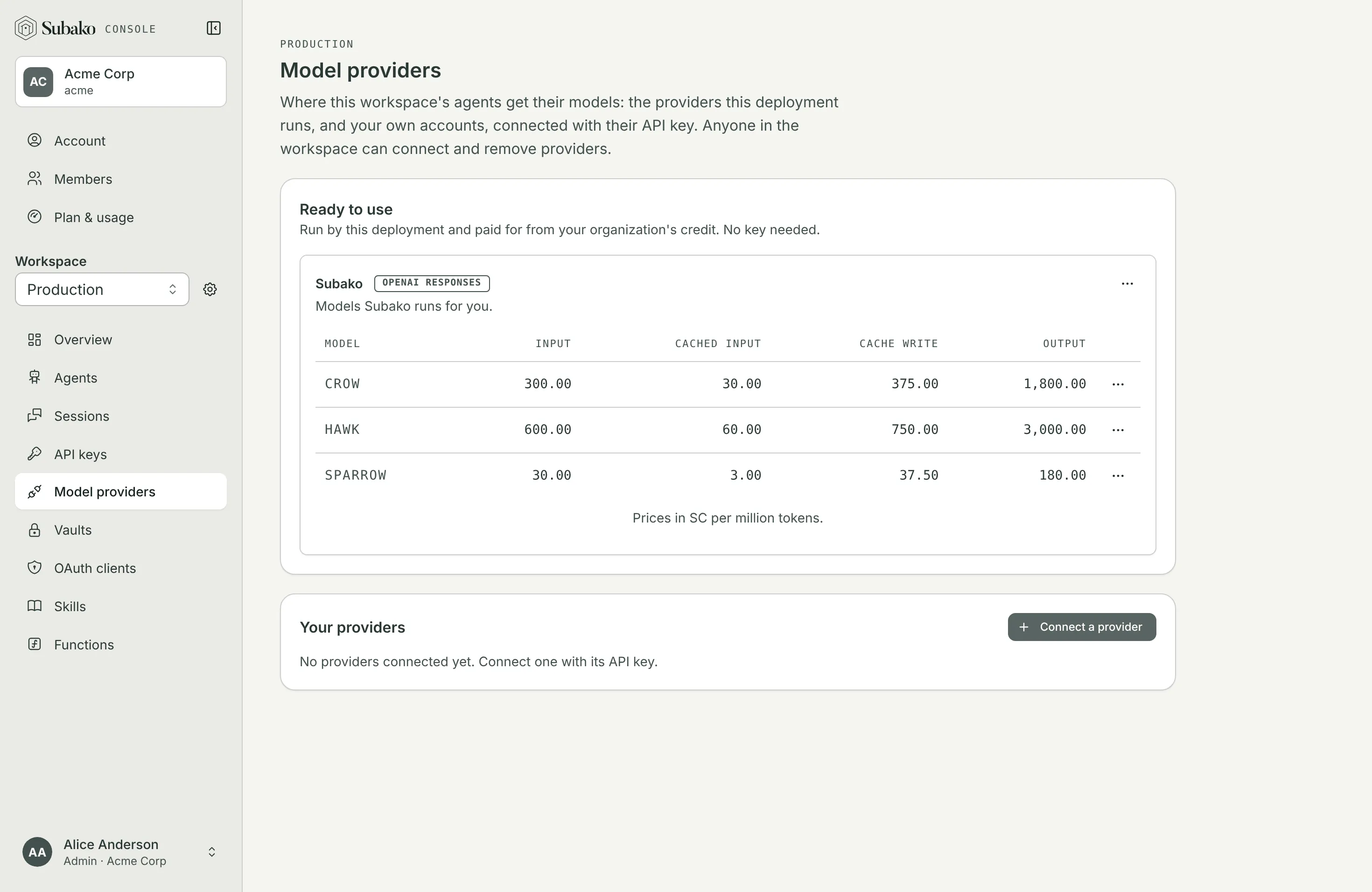
Ready to use
Under Ready to use are the providers Subako runs. They need no key, every workspace sees them, and their calls are paid for from your organization’s credit. Each model is listed with its price in SC per million tokens: input, cached input, cache writes, and output.
On Subako Cloud that is the Subako provider, which speaks the OpenAI Responses API:
| Model | For |
|---|---|
sparrow |
Simple, high-volume agent tasks |
crow |
Balanced capability and cost for everyday tasks |
hawk |
Complex reasoning and coding tasks |
A model listed as Not priced cannot be used until the deployment prices it.
Your own providers
Under Your providers are accounts of your own, connected with their key, as a role in your AWS account for Amazon Bedrock, under a federation rule in your Anthropic organization for the Claude API, or through a workload identity provider in your OpenAI organization for the OpenAI API: you pay the provider directly, and Subako charges no credit for the tokens. Connect a provider asks for:
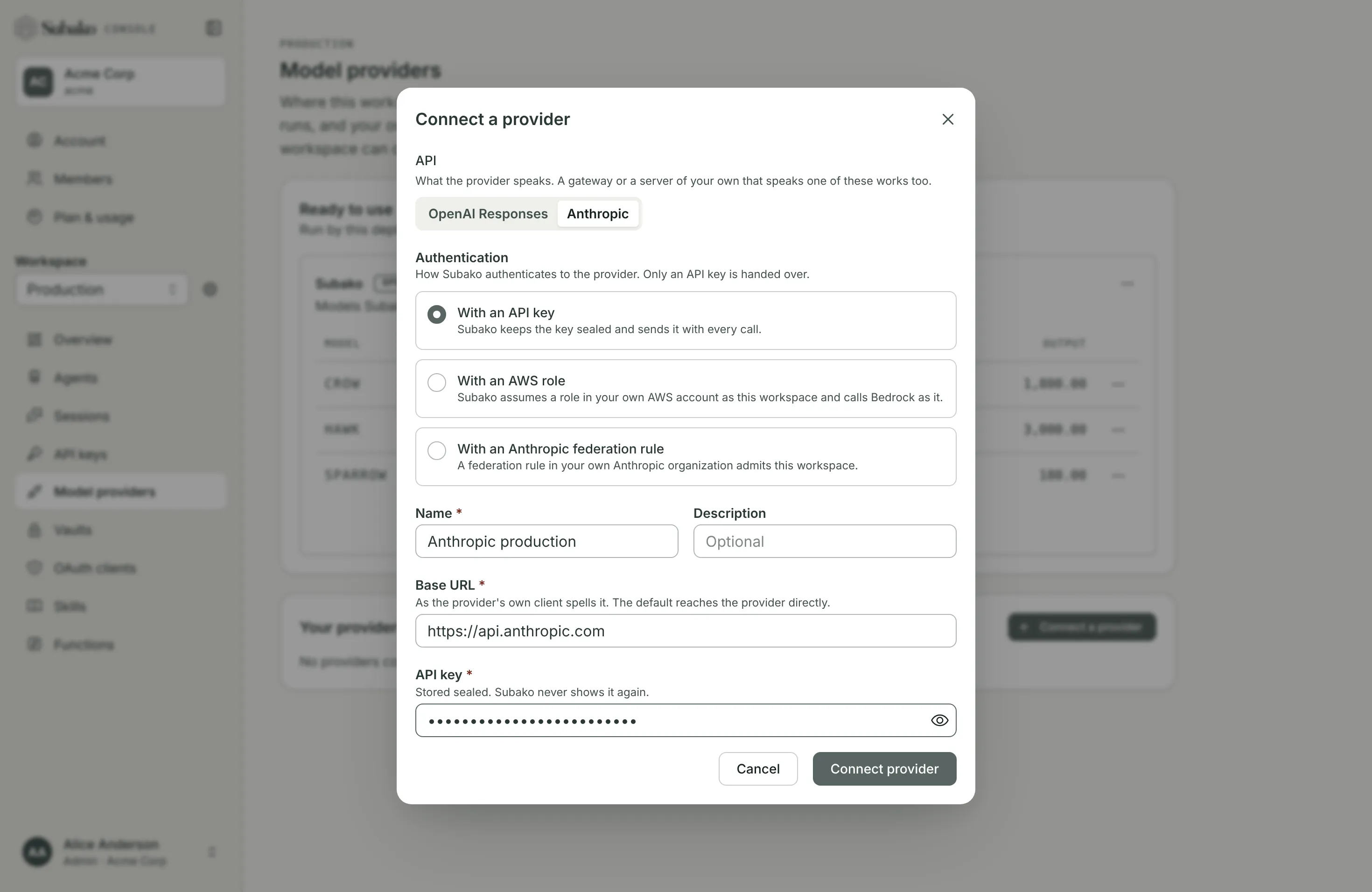
| Field | What it is |
|---|---|
| API | OpenAI Responses or Anthropic — what the provider speaks. A gateway, or a server of your own, that speaks one of them works too. |
| Name, Description | How people in the workspace tell it apart. |
| Base URL | As the provider’s own client spells it. The default reaches the provider directly. It must be a public https address. |
| Authentication | With an API key; With an AWS role to reach Bedrock without one; With an Anthropic federation rule to reach the Claude API without one; or With an OpenAI workload identity provider to reach the OpenAI API without one. The last three are offered only where the deployment issues workload identity. |
| API key | Stored sealed. Subako never shows it again. |
The provider’s row menu opens its Details, where Replace API key rotates the key without touching the agents that use it. Edit renames it or changes its base URL. Delete removes it; agents set to use it fail their next model call until they are published with another provider.
Amazon Bedrock with an AWS role
A provider can reach Amazon Bedrock in your own AWS account with no key at all. Subako is an OpenID Connect issuer, and each workspace has a subject of its own. A role in your account trusts this workspace’s subject, and Subako calls Bedrock as that role. No key is handed over, and you revoke access from your own account.
Choose With an AWS role under Authentication in Connect a provider. The dialog shows what your account must trust under Trust this workspace in AWS:
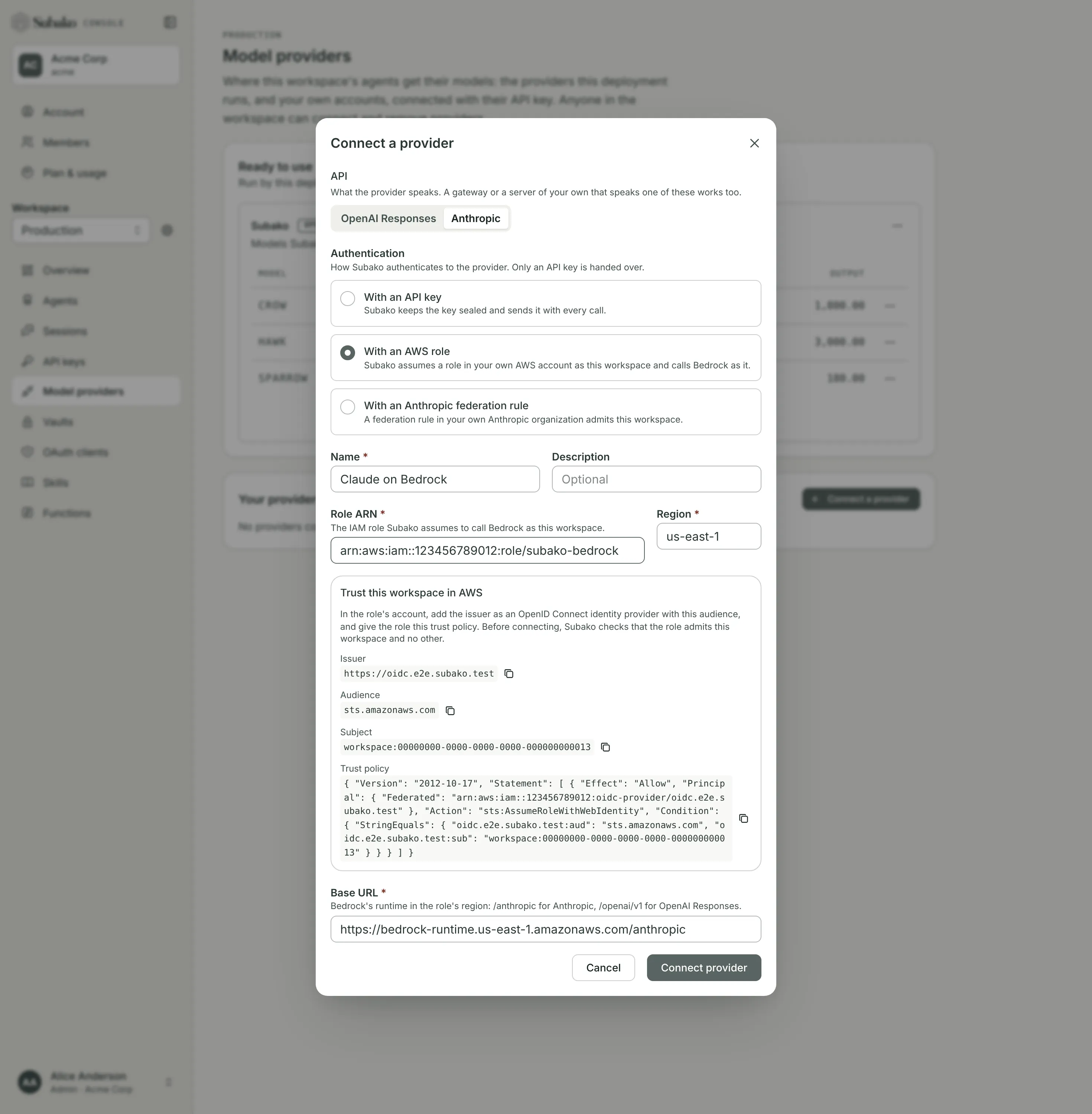
| Value | What it is |
|---|---|
| Issuer | The deployment’s OpenID Connect issuer, such as https://oidc.us.cloud.subako.ai. |
| Audience | sts.amazonaws.com. |
| Subject | workspace: followed by this workspace’s ID. It names this workspace and no other. |
| Trust policy | The role’s trust policy, filled in with the values above and the account in the Role ARN. |
1. Register the issuer
In the IAM console, under Identity providers, add a provider of type OpenID Connect, with the Issuer as its provider URL and the Audience as its audience. An account needs this once, however many workspaces it trusts.
2. Create the role
Create a role with a custom trust policy, and paste the Trust policy from the dialog. It admits the issuer for this audience and this workspace’s subject alone:
{
  "Version": "2012-10-17",
  "Statement": [
    {
      "Effect": "Allow",
      "Principal": { "Federated": "arn:aws:iam::123456789012:oidc-provider/oidc.us.cloud.subako.ai" },
      "Action": "sts:AssumeRoleWithWebIdentity",
      "Condition": {
        "StringEquals": {
          "oidc.us.cloud.subako.ai:aud": "sts.amazonaws.com",
          "oidc.us.cloud.subako.ai:sub": "<Subject, whole>"
        }
      }
    }
  ]
}
Keep the sub condition as the dialog writes it: StringEquals with the whole Subject. Without it, or with a pattern such as StringLike, the role would trust other workspaces too, and Subako refuses such a role.
Give the role permission to invoke the models you want to use, and nothing more. A cross-region inference profile is authorized together with the models it routes to:
{
  "Version": "2012-10-17",
  "Statement": [
    {
      "Effect": "Allow",
      "Action": ["bedrock:InvokeModel", "bedrock:InvokeModelWithResponseStream"],
      "Resource": [
        "arn:aws:bedrock:us-east-1:123456789012:inference-profile/us.anthropic.claude-sonnet-4-5-20250929-v1:0",
        "arn:aws:bedrock:*::foundation-model/anthropic.claude-sonnet-4-5-20250929-v1:0"
      ]
    }
  ]
}
3. Connect the provider
Back in the dialog, fill in:
| Field | What it is |
|---|---|
| API | Anthropic for Claude on Bedrock; OpenAI Responses for Bedrock’s OpenAI-compatible API. |
| Role ARN | The role from step 2, such as arn:aws:iam::123456789012:role/subako-bedrock. |
| Region | The region Bedrock is called in, us-east-1 by default. |
| Base URL | Filled in from the API and the region: the region’s Bedrock runtime, https://bedrock-runtime.{region}.amazonaws.com, followed by /anthropic for Anthropic or /openai/v1 for OpenAI Responses. |
The base URL may instead name the region’s Bedrock Mantle, https://bedrock-mantle.{region}.api.aws, followed by /anthropic or /v1; Mantle serves the Responses API for models the runtime does not, such as openai.gpt-oss-120b. Its Responses API also needs bedrock:InvokeModel on the region’s default project, arn:aws:bedrock:{region}:{account}:project/default. Either host must be in the role’s region.
Before connecting, Subako checks that the role trusts this workspace and no other. If it does not, the provider is not connected; fix the identity provider or the trust policy and connect again.
An agent version names the model by Bedrock’s own ID, such as us.anthropic.claude-sonnet-4-5-20250929-v1:0.
From a terminal, subako model-provider workload-identity prints the values to trust, and subako model-provider create with --aws-role-arn and --aws-region connects the provider.
Changing or revoking access
The provider’s Details show its role and region. There is no key to replace; to use another role, connect a new provider. Edit still renames it or changes its base URL.
Once you remove the workspace from the role’s trust policy, the provider’s calls fail within an hour, until the trust is restored. To stop them at once, also revoke the role’s active sessions in IAM.
The Claude API with an Anthropic federation rule
A provider can reach the Claude API in your own Anthropic organization with no key either, through Anthropic’s Workload Identity Federation. Your organization registers Subako’s issuer, and a federation rule in it admits this workspace as one of your service accounts. No key is handed over, and you revoke access from the Claude Console.
In Connect a provider, choose Anthropic as the API, then With an Anthropic federation rule under Authentication. The base URL is fixed to https://api.anthropic.com. The dialog shows what your organization must hold under Trust this workspace in Anthropic:
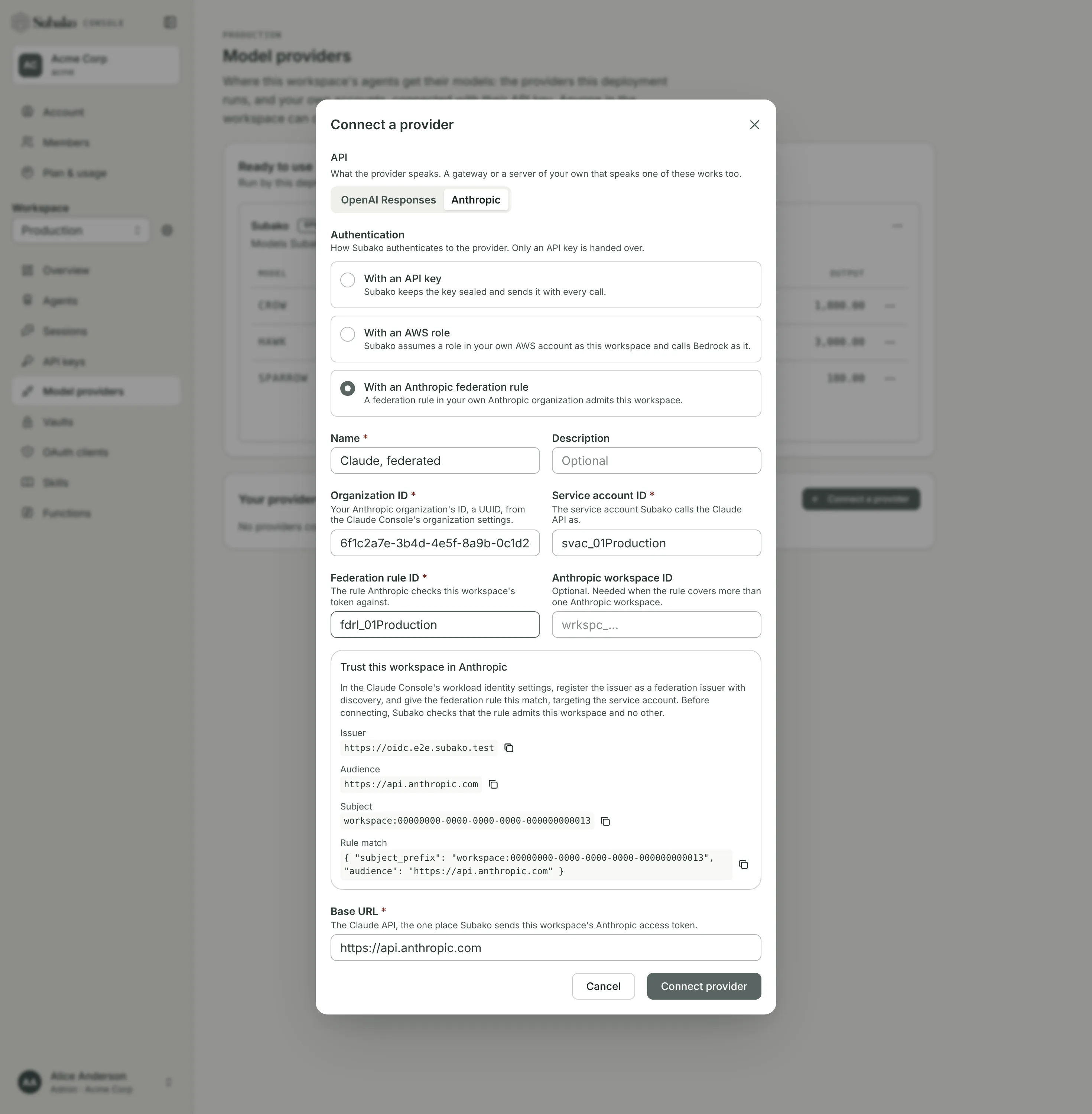
| Value | What it is |
|---|---|
| Issuer | The deployment’s OpenID Connect issuer, such as https://oidc.us.cloud.subako.ai. |
| Audience | https://api.anthropic.com. |
| Subject | workspace: followed by this workspace’s ID. It names this workspace and no other. |
| Rule match | The federation rule’s match: the whole Subject as subject_prefix, and the Audience. |
1. Register the issuer and create the rule
In the Claude Console, open Workload identity, select Connect workload, and choose Custom OIDC. You need the admin or owner role in the Anthropic organization.
- Issuer: the Issuer from the dialog, with the JWKS source left at
discovery. - Match:
subject_prefixset to the whole Subject, with no trailing*, andaudienceset to the Audience. - Service account: the one the calls act as. It must be a member of the Anthropic workspace whose rate limits and usage the calls should count against; every service account is a member of the organization’s default workspace.
- Scope:
workspace:developer, the wizard’s default, orworkspace:inference. - Token lifetime: ten minutes or more.
A subject_prefix ending in * would admit other workspaces too, and Subako refuses such a rule.
Note the rule’s ID (fdrl_...) and the service account’s ID (svac_...) the wizard creates, and your organization’s ID, a UUID, from the Claude Console’s organization settings.
2. Connect the provider
Back in the dialog, fill in:
| Field | What it is |
|---|---|
| Organization ID | Your Anthropic organization’s ID. |
| Service account ID | The service account from step 1, svac_.... |
| Federation rule ID | The rule from step 1, fdrl_.... |
| Anthropic workspace ID | Optional: the Anthropic workspace the calls are scoped to, wrkspc_.... Needed only when the rule covers more than one Anthropic workspace. |
Before connecting, Subako checks that the rule admits this workspace and no other. If it does not, the provider is not connected; fix the issuer or the rule and connect again. Anthropic’s error says only Authentication failed; the authentication history under Workload identity says what did not match.
An agent version names the model by the Claude API’s own ID, such as claude-sonnet-5.
From a terminal, subako model-provider workload-identity prints the values to set, and subako model-provider create with --anthropic-organization-id, --anthropic-service-account-id and --anthropic-federation-rule-id (and --anthropic-workspace-id when needed) connects the provider.
Changing or revoking access
The provider’s Details show its rule, service account, organization and Anthropic workspace. There is no key to replace; to use another rule, connect a new provider. Edit still renames it.
Once you change or archive the rule, the provider’s calls fail within ten minutes, until the rule admits the workspace again.
The OpenAI API with an OpenAI workload identity provider
A provider can reach the OpenAI API in your own OpenAI organization with no key as well, through OpenAI’s workload identity federation. A workload identity provider in your organization trusts Subako’s issuer, and a mapping on it binds this workspace to one of your service accounts. No key is handed over, and you revoke access from your OpenAI organization.
In Connect a provider, choose OpenAI Responses as the API, then With an OpenAI workload identity provider under Authentication. The base URL is fixed to https://api.openai.com/v1. The dialog shows what your organization must hold under Trust this workspace in OpenAI:
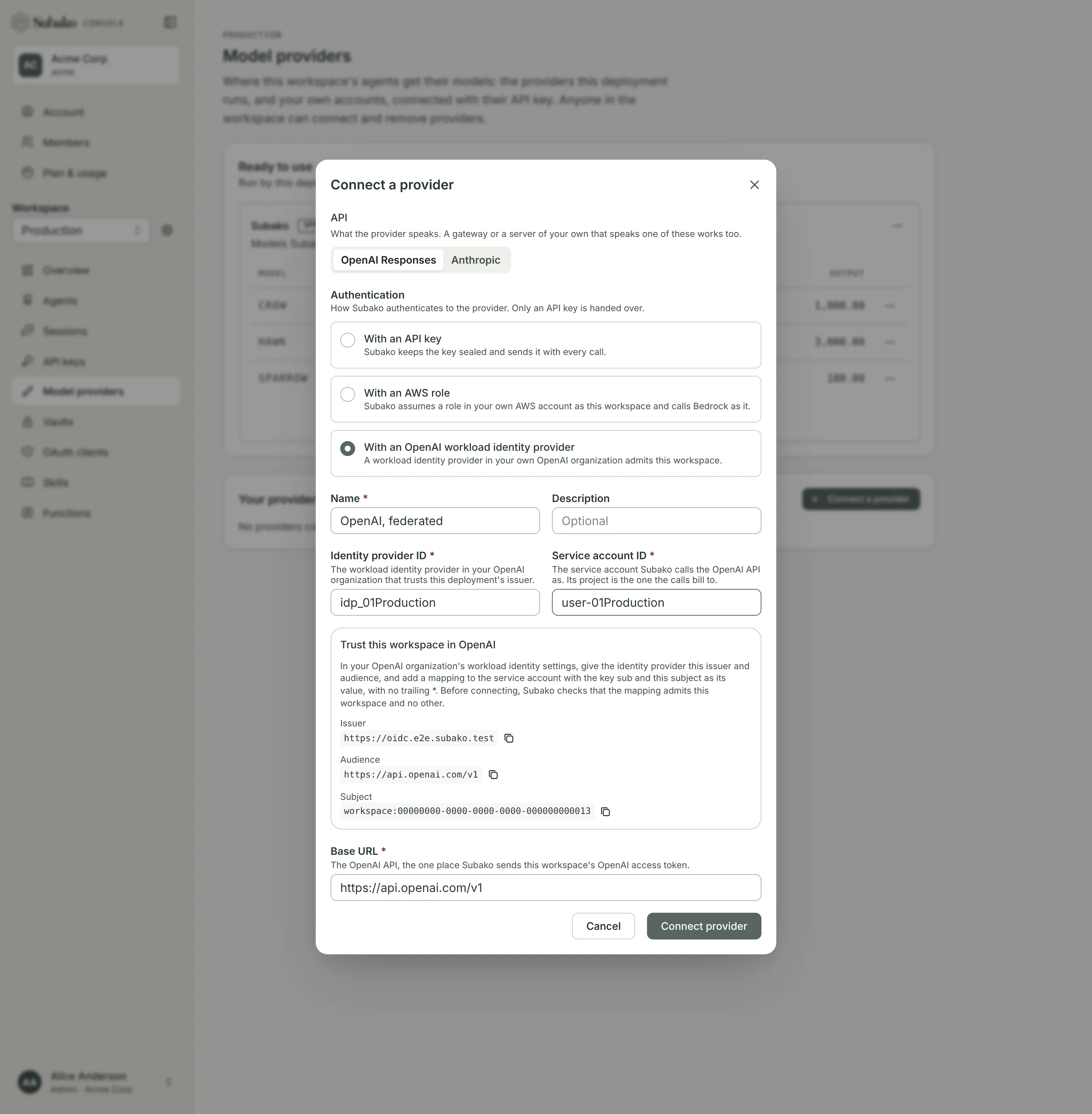
| Value | What it is |
|---|---|
| Issuer | The deployment’s OpenID Connect issuer, such as https://oidc.us.cloud.subako.ai. |
| Audience | https://api.openai.com/v1. |
| Subject | workspace: followed by this workspace’s ID. It names this workspace and no other. |
1. Create the identity provider and the mapping
In the OpenAI Platform, open Organization settings, then Security, and add a Workload identity provider.
- OIDC issuer URL: the Issuer from the dialog.
- Audience: the Audience, exactly.
- Key verification: leave it at OIDC discovery.
On the new identity provider, add a mapping:
- Key
sub, and Value the whole Subject, with no trailing*. - Project: the one the calls should bill to.
- Service account: the one the calls act as, new or existing, in that project.
- Permissions: what the Responses API needs, or none to use the service account’s own.
A value ending in * would admit other workspaces too, and Subako refuses such a mapping.
Note the identity provider’s ID (idp_...) and the service account’s ID.
2. Connect the provider
Back in the dialog, fill in:
| Field | What it is |
|---|---|
| Identity provider ID | The identity provider from step 1, idp_.... |
| Service account ID | The service account the mapping binds. |
Before connecting, Subako checks that the mapping admits this workspace and no other. If it does not, the provider is not connected; the error says what did not match. Fix the identity provider or the mapping and connect again.
An agent version names the model by the OpenAI API’s own ID, such as gpt-5.
From a terminal, subako model-provider workload-identity prints the values to set, and subako model-provider create with --openai-identity-provider-id and --openai-service-account-id connects the provider.
Changing or revoking access
The provider’s Details show its identity provider and service account. There is no key to replace; to use another identity provider or service account, connect a new provider. Edit still renames it.
Once you disable or change the mapping, the provider’s calls fail within an hour, until the mapping admits the workspace again.
Choosing one in an agent
The version editor lists providers under Offered by the platform and This workspace’s own. A platform provider offers its priced models to pick from. For your own provider you type the model’s ID as the provider’s API takes it — claude-sonnet-5, say — and it is checked when a session first calls it, not when you publish.
The editor asks for model settings in the provider’s own terms: an Anthropic model takes Thinking and Effort, an OpenAI Responses model takes Reasoning effort, and both take an Output limit and a Context window.