Plan and usage
Plans, credit, and what is billed.
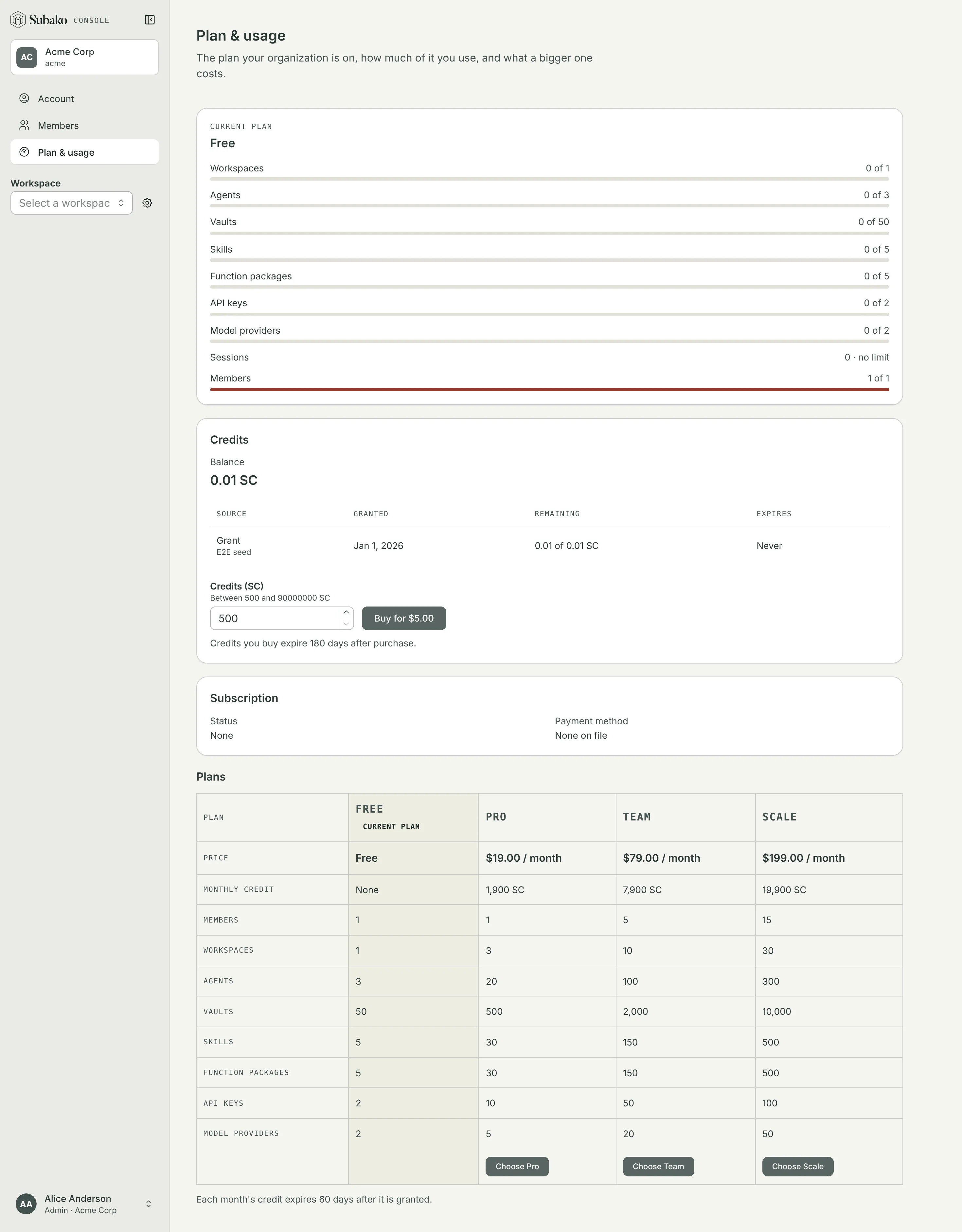
Plan & usage, in the sidebar, shows the plan your organization is on and how much of each capped resource it holds: workspaces, agents, vaults, skills, function packages, API keys, model providers, and members. Admins also see the organization’s credit, and on Subako Cloud they change the plan and buy credit here.
What is billed
Subako’s metered services spend SC (Subako Credits) from the organization’s balance. 100 SC is US$1.
| Service | What is metered | Subako Cloud price |
|---|---|---|
| Agent runs | Time a run is working | 0.01388889 SC per second ($0.50 an hour) |
| Platform models | Tokens, per million | sparrow: 30 input, 3 cached input, 37.5 cache write, 180 output |
crow: 300 input, 30 cached input, 375 cache write, 1,800 output |
||
hawk: 600 input, 60 cached input, 750 cache write, 3,000 output |
||
| Functions | Time a call runs, waiting on HTTP included | 0.01 SC per second ($0.36 an hour) |
| Bytes written to the Session Volume, each file counted as at least 32 KiB | 7 SC per GiB ($0.07 per GiB) | |
| Files kept on the Session Volume | 0.66666667 SC per GiB-day ($0.20 per GiB-month) | |
| Sandboxes | Time a sandbox is running | 0.02777778 SC per second ($1.00 an hour) |
| Archives kept of a sandbox’s files | 0.33333333 SC per GiB-day ($0.10 per GiB-month) |
Tokens on a model provider of your own are billed by that provider, not by Subako; the agent’s run time still is. Storage is billed until the files are deleted: a session’s volume when the session is, an archive when you delete it from the session’s Sandboxes tab.
An organization out of credit cannot start new metered work — a run, a function call, a write — until it holds some again. Reading and deleting what it has keeps working.
Plans
Every new organization starts on Free, with 500 SC granted once. Paid plans raise the caps and grant SC every month.
| Free | Pro | Team | Scale | |
|---|---|---|---|---|
| Price | Free | $19 / month | $79 / month | $199 / month |
| Monthly credit | — | 1,900 SC | 7,900 SC | 19,900 SC |
| Members | 1 | 1 | 5 | 15 |
| Workspaces | 1 | 3 | 10 | 30 |
| Agents | 3 | 20 | 100 | 300 |
| Vaults | 50 | 500 | 2,000 | 10,000 |
| Skills | 5 | 30 | 150 | 500 |
| Function packages | 5 | 30 | 150 | 500 |
| API keys | 2 | 10 | 50 | 100 |
| Model providers | 2 | 5 | 20 | 50 |
Changing the plan
Only admins change the plan; members see the plans side by side.
Choose a plan
In the plans table, choose Choose Pro — or Team, or Scale. The console opens Stripe’s checkout.
Pay
Enter a card and pay. Stripe returns you to Plan & usage, which says Payment complete, with the new plan and its first month’s credit in place. Leaving the checkout returns you with Checkout canceled, and nothing charged.
To move between paid plans, change the card, read invoices, or cancel, choose Manage billing under Subscription. It opens Stripe’s billing portal, which returns you to this page.
Buying credit
Credit can be bought at any time, on any plan. Under Credits, enter an amount in Credits (SC) — from 500 SC — and choose Buy for $…. Stripe’s checkout takes the payment, and the credit is in the balance when you come back.
Credit lots
The balance is made of lots: each grant or purchase is one. The Credit lots table lists those that still count, the soonest to expire first, and calls out each that expires within 30 days. Spending draws on the lot that expires soonest.
| Lot | Expires |
|---|---|
| The 500 SC every new organization starts with | 60 days after it is granted |
| A plan’s monthly credit | 60 days after the month’s invoice is paid |
| Credit you buy | 180 days after the purchase |
From the CLI
The same from a terminal: subako cloud billing show prints the plan, subscription, and card; subako cloud billing subscribe --plan pro and subako cloud billing credits --amount 1000 open Stripe’s checkout; subako cloud billing portal opens the billing portal; and subako org credits prints the balance and its lots. See the CLI reference.